Free
$0
No credit card required
- 3 projects
- 100k events / month
- 14-day telemetry history
- 250 MB of input/output uploads / month
- 14-day captured-file retention
- Dataset creation, label review & export
For AI running on devices and in the cloud.
See where model behavior changes across releases, runtimes, and devices. Inspect captured inputs, outputs, and feedback, then turn selected examples into datasets for evaluation and training.
Input/output capture is optional · No credit card required
Product recognition dropped on one iPhone cohort.
Mean prediction confidence · daily7 days agomodel v4.2 rollouttoday
Confidence by class: bottle 0.38 boxed item 0.41
Users are correcting more names and numbers.
One corrected interactionCorrection rate after Android build UP1A.231005: 14%, up from 6% across 6,140 interactions.
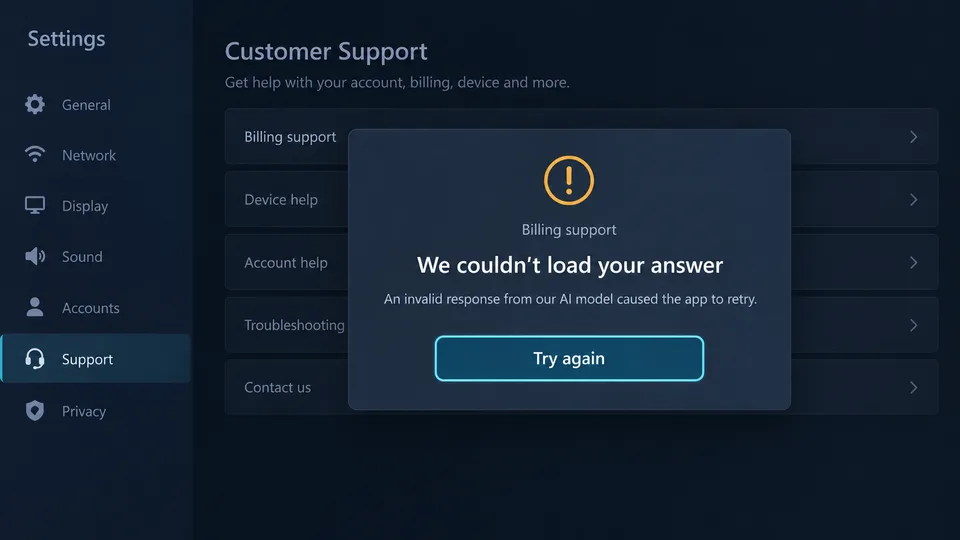
A new prompt is producing invalid fields.
Prompt v12 · small-model-v3{"priority": "urgent", "category": "billing"}
priorityExpected low | medium | highFirst-response validity: 71% for prompt v12 + small-model-v3, versus 97% for prompt v11 on the same model.
See the product
WildEdge flags models that drift from their own history. This one lost 17% confidence after an app update, with no crash and no error.
View full screenshot ↗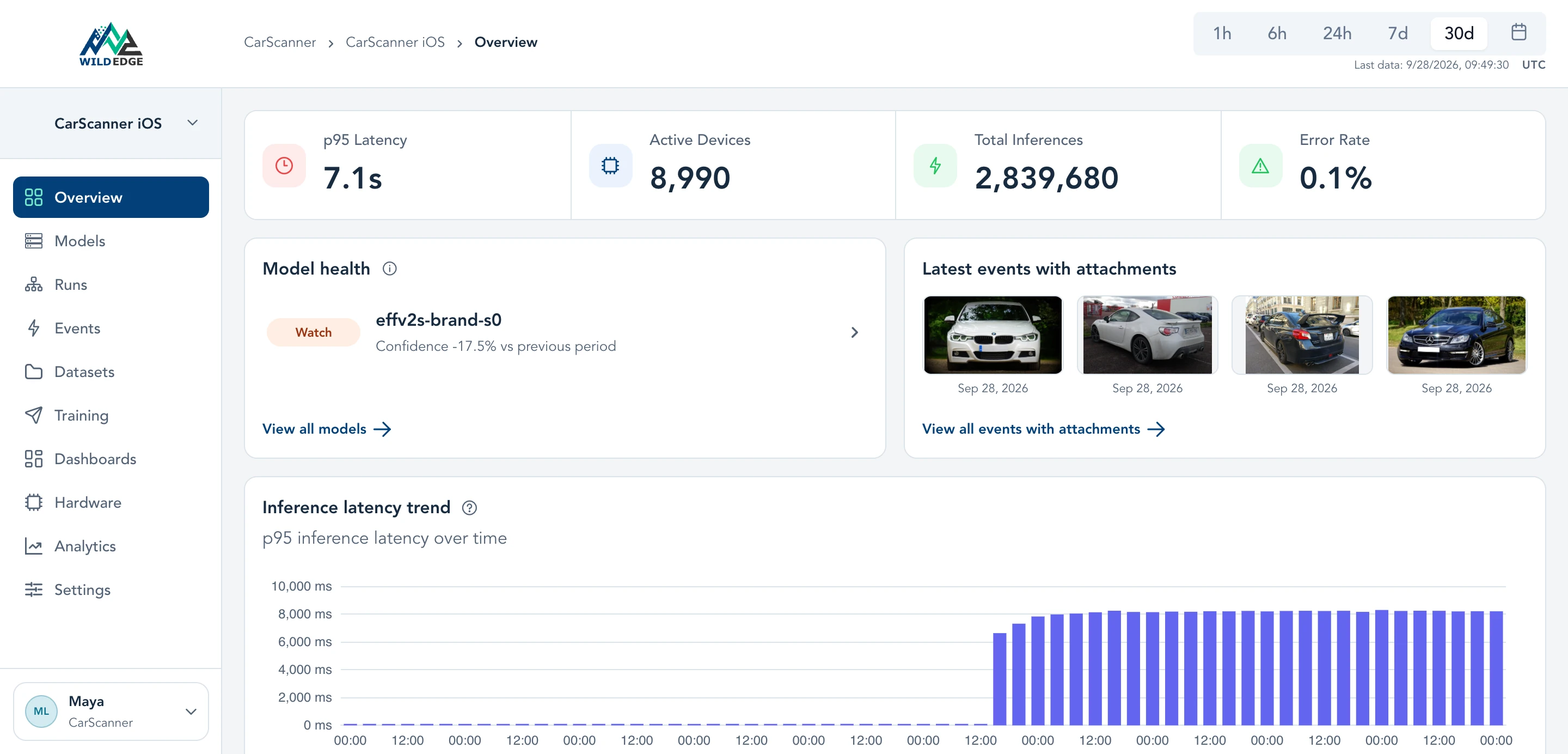
Filter by device, app version, or runtime. On iPhone 14, confidence fell 37% the day version 1.38 rolled out.
View full screenshot ↗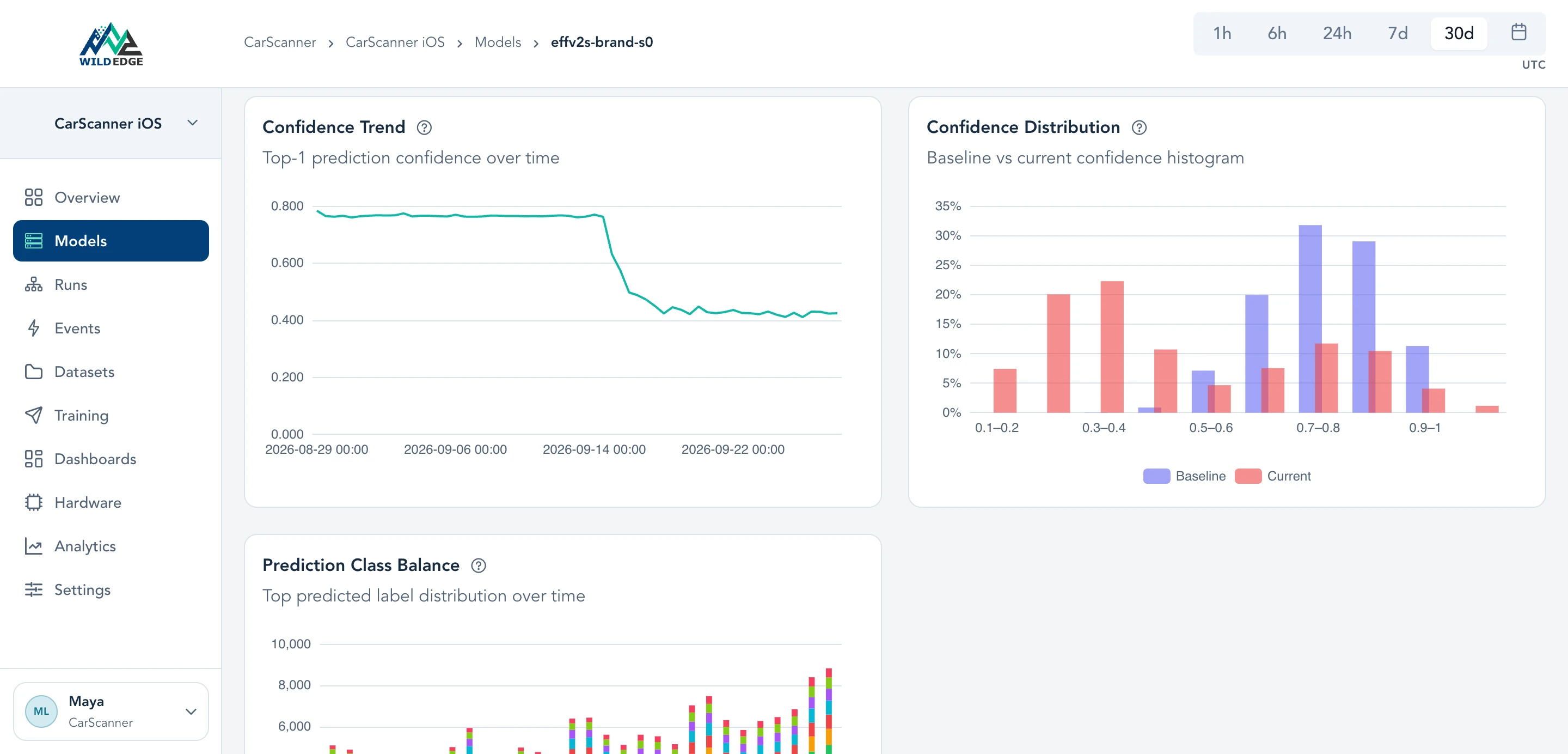
Open a low-confidence prediction to see the input. This BMW was classified as a Ford, at 33% confidence.
View full screenshot ↗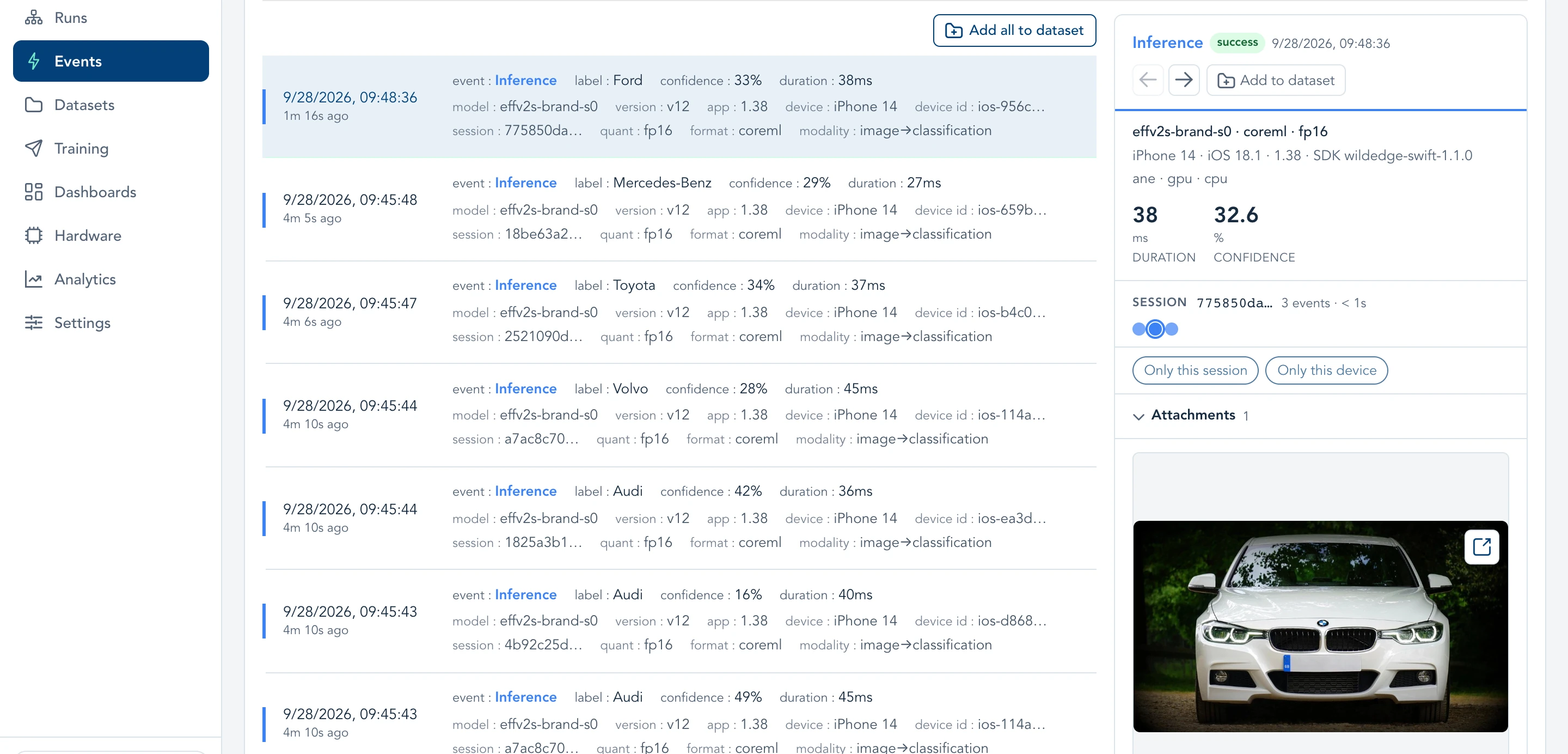
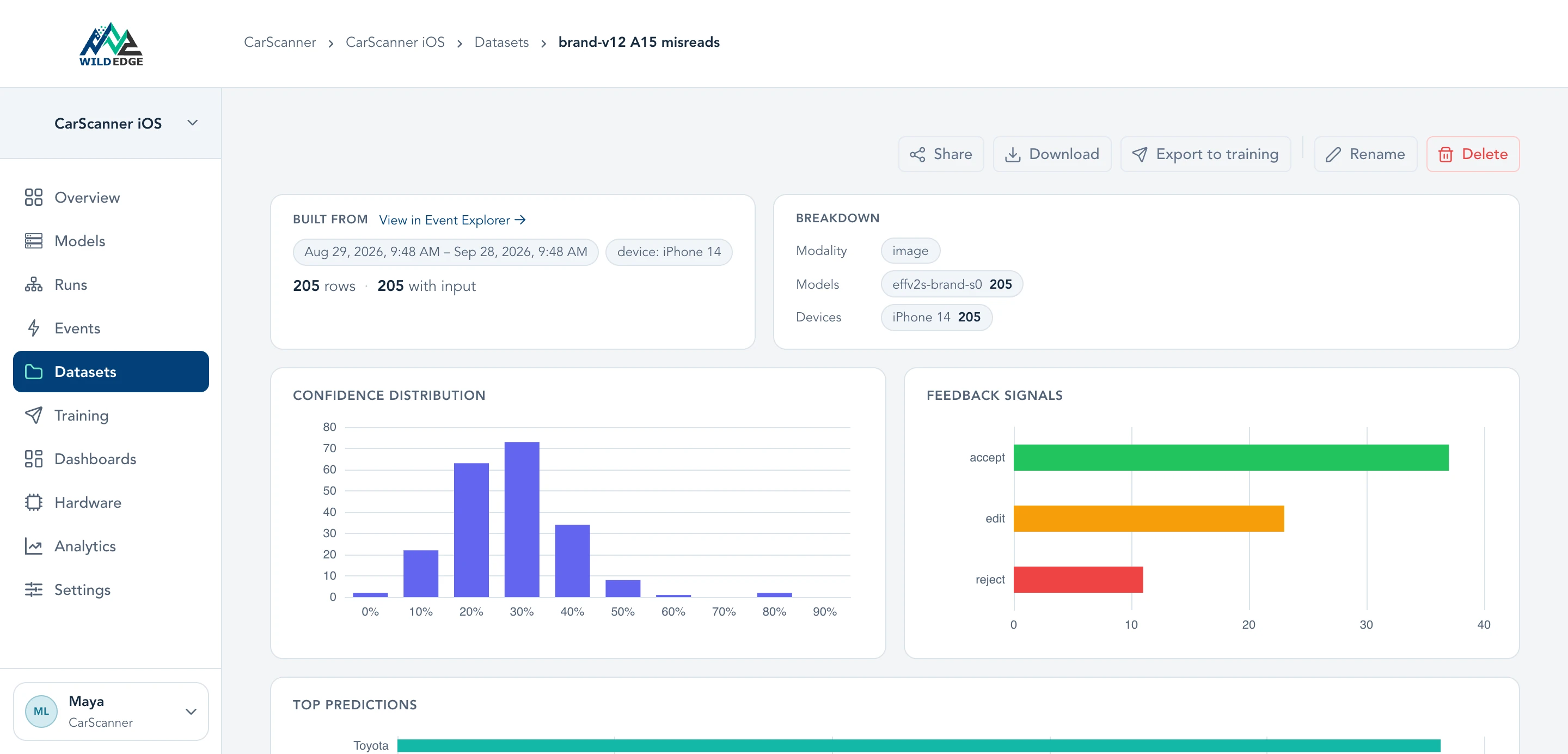
Collect the misreads into a dataset, check them against user corrections, and export them for retraining.
Integrations
Add an SDK to collect inference telemetry. Enable input and output capture when you need examples for review.
uv add wildedge-sdkTransformers · PyTorch · TensorFlow · Keras · ONNX · MLX · llama.cpp · Ultralytics · timm · OpenAI · Anthropic · OpenAI-compatible APIs
implementation("dev.wildedge:wildedge-android:0.1.0")TFLite · Play Services TFLite · ONNX Runtime · ML Kit · LiteRT · LiteRT LLM · Gemini · Custom models
.package(url: "https://github.com/wild-edge/wildedge-swift.git", from: "1.1.0")Core ML · TFLite · ONNX Runtime · ML Kit · ExecuTorch · llama.cpp · OpenRouter · Gemini · Custom models
What happens on real devices
| Chipset | Execution path | p95 latency |
|---|---|---|
| Tensor G3Pixel 8, Pixel 8 Pro | 180ms | |
| Snapdragon 8 Gen 2Galaxy S23, OnePlus 11 | 210ms | |
| Tensor G2Pixel 7, Pixel 7a | 340ms | |
| Exynos 1380Galaxy A54, Galaxy M54 | 520ms |
Work with your coding agent
Give your coding agent access to WildEdge production telemetry. It can investigate affected devices, inspect traces, and connect runtime failures to your code.
Connect your coding agent Powered by WildEdge MCP› Our brand classifier looks worse lately. What changed, and where?
✓ Compared model versions by device
✓ Split A15 iPhones by accelerator
✓ Checked latency and user feedback
App 1.38 shipped effv2s-brand-s0 v12. The drop only happens on A15 iPhones running v12 on the Neural Engine.
| A15 confidence | v11 | v12 |
|---|---|---|
| Neural Engine | 0.77 | 0.31 |
| GPU | 0.76 | 0.77 |
Latency is unchanged, so the model runs normally and returns wrong answers. User feedback on these phones rose from 7% to 28% of scans.
Likely cause: a v12 layer that the A15 Neural Engine computes incorrectly in fp16. Quick fix: set computeUnits = .cpuAndGPU for v12 on iPhone14,x, then compare layer outputs on an A15 device.
Evidence: version × device × accelerator · feedback rate · latency
Device to cloud
When a local model hands work to a cloud model, inspect both steps in the same trace. See where time was spent and connect the response to the recorded user outcome.
Compare WildEdge with other toolstr_01J8Y2Q41.04 s totalPrivate deployment
Run WildEdge on-premises or in your own cloud. Structured records use an open table format, with captured inputs and outputs in object storage.
Try WildEdge free. Choose a plan as your usage and deployment needs grow.
Free
No credit card required
Pro
Billed monthly
Enterprise
For private deployments and scale
Need more upload capacity? Talk to us about additional capacity ↗
Event and upload allowances are shared across your company’s projects and reset each monthly usage period. Input and output files both count toward the upload allowance. Adding a file to a dataset does not extend its retention; export files you need to keep before they expire. Training integrations require an account with the destination provider.